Hair Modeling
Example of Hair Modeling: Cutting the tails and then adjusting theirs position using Root mode
Hair Tool has few grooming tools that will allow you to manually adjust hair strands:
- Cut using [K] key, then click LMB on start and end point to perform cut,
- Adjust Length [E] key and move your mouse up or down,
- Bend, rotate, scale, move with 'Linear Deformer' [Ctrl+D] - key
- Transformation tools, with few modes: IK/Rope like physics, 'Root' mode - rotate strands round their roots,
- duplicate/delete strands, with [Shift+D] and [X] or [Del] keys
- adjust tilt and taper, with [Ctrl+T] for tilt and [Alt+S] for radius
- group selection, box, circle, lasso selection tools,
- and more
Note: If you cannot edit hair, then you may need to convert your procedurally generated hair to 'real' geometry - using Bake operator.
Example of Selection Groups, Knife and Linear Deformer
Getting Started
To enable Hair Modeling use:
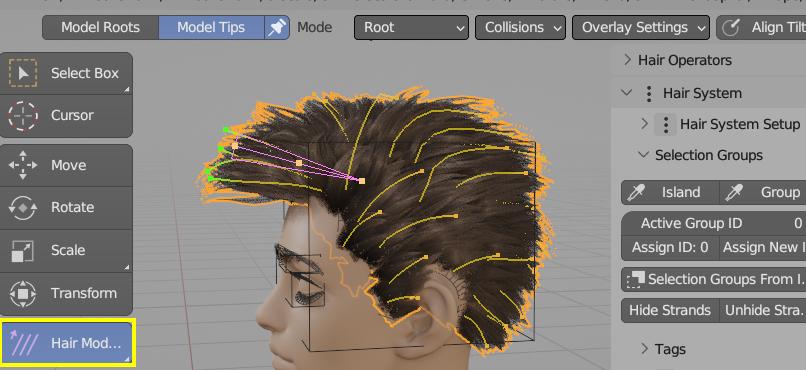 [1] Hair Modeling Tool location
- Left sidebar (T key): Hair Modeling Icon (for Object and Curves Sculpt modes),
- Strand Overlay: Viewport Overlays > Draw Strands Overlay
Strands Overlay
It renders strands on top of hair card geometry in Object mode using a custom depth offset, which allows strands to be partially occluded by mesh geometry. This is in contrast to Blender's built-in curve rendering, where strands are always drawn on top of mesh geometry, making it impossible to distinguish which strands lie in front of the mesh and which lie behind it.
Strands Overaly - it will draw strands on top of haircards geometry (similar to mesh retopo overlay)
Overlay Type - Normal (only highlight selected strands), Group (colorize strands based on Selection Groups they belong to), Random (random color for each strand)
Draw Offset - offset rendering of Strands Overlay closer to the camera
Show Group Colors - show colors of Selection Groups
Colorize Strands - it will colorize: grouped, random or selected strands, using custom color attribute.
Colorize Attribute - name of custom color attribute to use for strand colorization (default is 'SystemColor')
Transform Modes
There are three strands translation/movements modes (use with G, R, S keys):
- Chain mode (IK), move hair endings with rope like behavior
- Normal (FK) mode, works similar to Blender built-in proportional editing.
- Root rotate/scale hair using root as pivot point
Showcasing Chain (IK) transform mode. Since HT 3.4 IK mode supports collisions of hair strands with scalp mesh
Hotkeys
Note: Switching to Hair Modeling Tool will override some default Blender 3D view shortcuts. To select other objects use Alt+RMB (since RMB button will select hair tip - rather than object)
In round brackets I marked optional modifier keys e.g. (Alt).
| Hotkey | Selections |
|---|---|
| Ctrl+MMWheel | Offset selection |
| (Shift)+RMB | Select Points |
| (Alt)+A | (de)Select All |
| Ctrl+I | Invert Selection |
| (Alt)+B+LMB | Box (de)Select |
| (Alt)+C | Circle (de)Select |
| Ctr+(Alt)+LMB | Lasso (de)Select |
| Hotkey | Translation |
|---|---|
| G, R, S | Grab, Rotate, Scale |
| Hotkey | Add/Delete |
|---|---|
| X, Del | Delete Selected |
| Shift+D | Duplicate strands |
| Hotkey | Radius/Tilt |
|---|---|
| Alt+S | Adjust Radius |
| Alt+R | Reset Radius |
| Ctrl+T | Adjust Tilt |
| Alt+T | Reset Tilt |
| Hotkey | Modeling |
|---|---|
| Ctrl+D | Linear Deformer |
| K | Cut strands |
| E | Extend strands |
| I | Straighten strands |
Offset selection
Ctrl + MMB scroll - changes which point along the strand length can be selected
Linear Deformer
Ctrl+D - rotate, bend, scale, move selected curves using on screen gizmo (special thanks to Mira Tools developer for letting me include modified version of his tool in HTool)
Extend
E - adjust length of selected strands
Duplicate and Delete
Shift+D - duplicate; X or Del delete selected strands
Interpolate Strands
Similar to Interpolated Strands Hair System type, but can be used on selected strands only
Located under Ctrl+Shift+H > Utils > Interpolate Strands (pie menu got clipped in video above)
Knife
K - cut selected strands. Define cut line using LMB (first to mark start point, then next LMB click to mark end point)
Symmetry
Hair Tool has now support of symmetrical Hair Modeling (in past using Transform Modes, Knife, Extend etc. would work only on one side of the hair).
Demo of using symmetry with Transform, Extend, Draw and Knife tools
There is now option under Ctrl+Shift+H > Symmetrize, which will create symmetrical copy of selected hair strands on the other side of the head.
Note: Some of the symmetry tools like: Drawing or Symmetrize, won't work in blender 4.2 (Blender 4.3+)
Edit Mode
Some of the modeling tools were missing in Blender 3.6. They were implemented in Hair Tool - under W context menu.
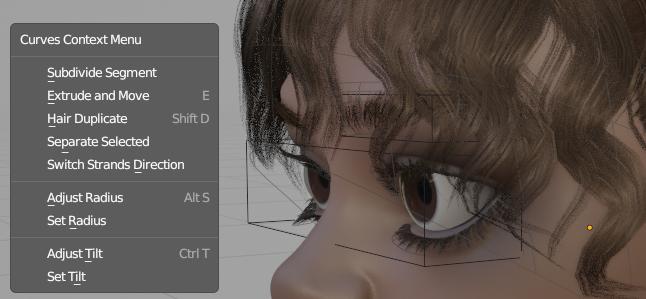 W - menu in edit mode